|
|
Article ID: 1797
Last updated: 10 Jul, 2025
Kaspersky Create Company And Download ReportKaspersky Create Company1. In your browser, go to Kaspersky Business Hub
2. Sign in to your account on Kaspersky Business Hub by specifying the user name and the password.
3. On the Companies tab, click the New company button in the right area of the screen.
4. Create a workspace Step 1: Select a software solution → Kaspersky Endpoint Security Cloud → Next.
Step 02: Terms of Use of Kaspersky Endpoint Security Cloud → select the check boxes → I accept the terms.
Step 03: Workspace information page of the Wizard, specify the main details of your company
Kaspersky Download Report1. In the workspace creation message, click the link to go to the list of companies → Expand the company name → Go to workspace.
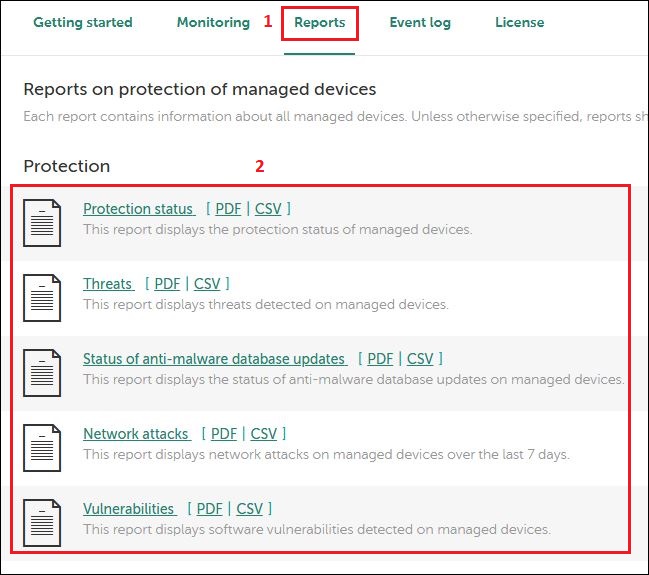
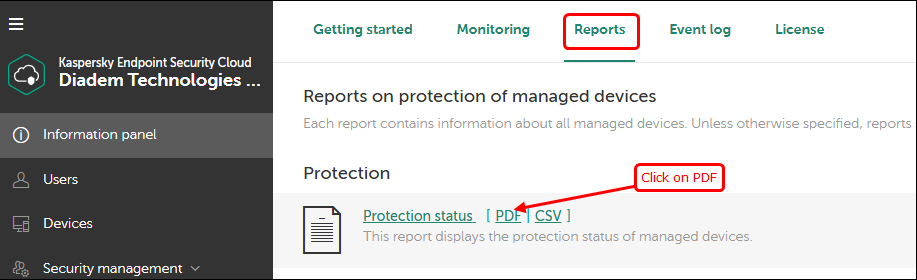
2. Go to reports → Select File → Click on PDF.
3. Click the download button to download the report.
4. Download all the PDF files listed below.
5. Once the PDF reports are downloaded, send them to the client via email .
This article was:
Report an issue
Article ID: 1797
Last updated: 10 Jul, 2025
Revision: 82
Views: 41
Comments: 0
|


.JPG)
.png)
.JPG)
.JPG)
.JPG)
.JPG)
.JPG)
.png)