
|
|
Article ID: 1823
Last updated: 24 Apr, 2026
How to Install & Launch the Fortinet VPN Client (Windows)
Uninstall the existing VPN client and reboot the computer. Installing the FortiClient software (Windows operating system 32bit/64bit) Download the Fortinet VPN Client (FortiClient) from the links : https://drive.google.com/file/d/1Xc4U47p-eaxoONzJrkaZQTZr5ziaEVke/view?pli=1 Step 01 : Accept the "License Aement" and click Next.
Step 02 : Click NEXT with default selection .
Step 03 : Click NEXT to Install to the default folder or click change to choose another destination for files to be saved, then Click NEXT to continue.
Step 04 : Then you will see the "Installation Screen " click Install.
Step 05 : After the installation is complete you will see the "Finish Screen" click Finish.
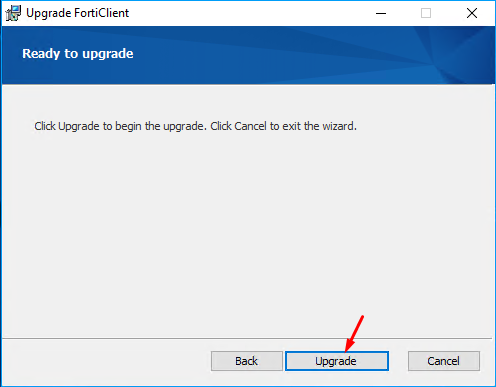
Step 06 : Now restart the computer. Step 07 : After the successful reboot, Download this Fortinet VPN Client (FortiClient) from the links : https://drive.google.com/file/d/1ZLNoFwRt9rQV-UztzJcot85CYB9QtQss/view Step 08 : Run the setup, Accept the "License Agreement" and click Next. Step 09 : Click Upgrade.
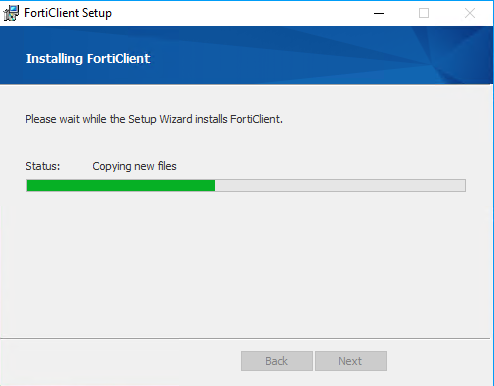
 Step 10 : Please wait while the Setup Wizard Installs FortiClient VPN.
 Step 11 : Restart your computer for configuration changes to take effect
Installation is now completed. Launching the Fortinet VPN Client and Importing Configuration into VPNAfter Fortinet has been installed, you will see a new icon appear in the System tray or Desktop Icon. Click and open the same Step 01 : In the FortiClient REMOTE ACCESS section, click "Add New VPN" button at top right and select "Add New VPN" button. Step 02 : Import Configuration for IPSec VPN
Import the configuration into the VPN and use password as 12345678, update the username with your own, and then proceed with the setup. The configuration file is attached in this KB for both Windows and MacOS; please check the Attachment tab. Step 03 : The username in the above configuration is set as Diadem. To access it using your own username, edit the imported VPN settings and replace the existing username with your username.
Step 04 : Now click on “Connect.” A pop-up will appear asking for your username and password. Enter your credentials, and you will be connected to the VPN.
(Optional) FortiClient V7.x Manual Configuration ReviewReview the configuration manually to ensure that the parameters are configured correctly. Apply the configuration as per the following settings for FortiClient V7.x.
This article was:
Report an issue
Article ID: 1823
Last updated: 24 Apr, 2026
Revision: 13
Views: 1161
Comments: 0
Tags
Attached files
|


.jpg)
.jpg)
.jpg)
.jpg)
.jpg)
.png)


